HomeLink®
- 3.2
- Rating
- 50.00K
- Installs
- Free
- Price

 Analysis by App-foxy
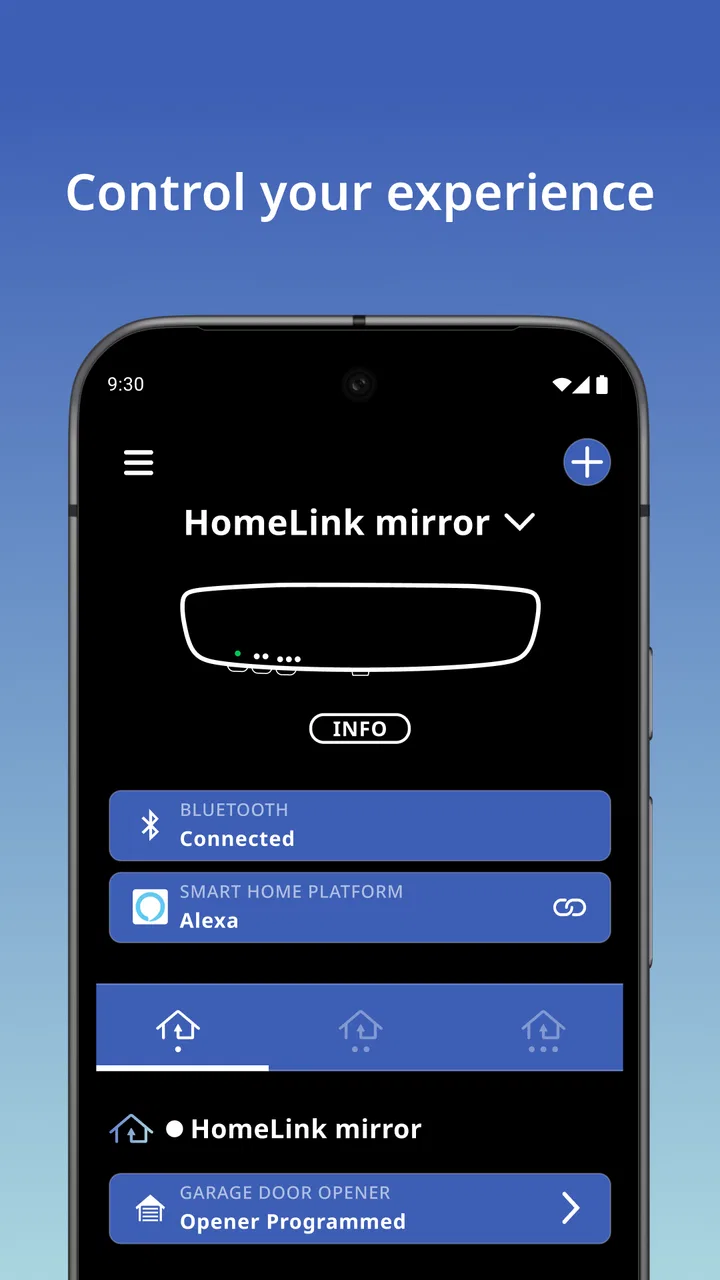
HomeLink® is an in-vehicle home automation app from Gentex Corporation, and its appeal is easy to understand: it aims to let your car take part in everyday home routines instead of leaving those controls entirely to a phone, wall panel, or remote. I see it as a focused convenience tool rather than a complete smart-home command center. That distinction matters, because the experience is most useful when your vehicle already fits into a compatible HomeLink setup.
I spent time looking at the app from the point of view of someone who wants fewer small interruptions during a normal drive. The strongest idea here is not endless automation or a long list of controls. It is the possibility of handling a familiar home-related action from the car, at the moment when reaching for a separate remote would be awkward. For the right driver, that narrow purpose can be more valuable than a crowded app with dozens of unrelated options.
Bringing a home control into the car
The central capability is the connection between an equipped vehicle and a home automation function. In practical terms, HomeLink® belongs to the Auto & Vehicles category because the car is not merely a place where the app happens to run. The vehicle is part of the workflow. That changes how I judge it: the question is less “How many controls does the app offer?” and more “Does it make the one control I use while arriving or leaving easier?”
You May Also Like
 Google Keep - Notes and lists
Google Keep’s Quiet Growth Shows the Appeal of Simpler Notes
As mobile work gets busier, Google Keep keeps winning a simple contest: capture a thought quickly, find it later, and get on with the day.

 Blood Strike: 2.5 Anniversary
Blood Strike’s Loadouts Turn Every Drop Into a Tactical Gamble
A close look at Blood Strike’s custom loadouts: how fast access to signature weapons reshapes its battle royale rhythm, rewards preparation, and narrows the gap between fights.

 Pandora - Music & Podcasts
Pandora’s Music Is Easy to Start, but Harder to Recover
Pandora’s strength is its low-effort path from a seed to a station. Its weak spot is how much confidence it asks you to place in connection, setup, and quiet recovery.

 8 Ball Pool
8 Ball Pool Is Built on Rivalries, Rematches, and Routine
A close look at the rivalries, rematches, shared routines, and unanswered safety questions that turn a quick pool match into a persistent mobile community.

 Samsung Music
Samsung Music’s Quiet Strength Is Playing What You Already Own
Its reach comes less from spectacle than from dependable access to a personal library. That simplicity is both the app’s strongest retention engine and its ceiling.

 AccuWeather: Weather Radar
AccuWeather Review: A Quick, Clear Forecast for Everyday Decisions
For everyday plans, the best forecast is the one you can understand quickly. AccuWeather makes rain timing, radar, and local conditions easy to act on, with a few trade-offs.
More From Our News Desk



This is especially relevant for a garage-related routine. A driver may be approaching home with shopping, children, luggage, or poor weather making a separate handheld remote inconvenient. A control available through the vehicle can reduce that moment of juggling. The benefit is small on paper, but repeated small conveniences are exactly where automotive apps can earn their place.
I would not describe this as a replacement for every smart-home platform. A general home automation app usually puts rooms, scenes, schedules, sensors, and household devices at the center. HomeLink® takes the opposite approach: it puts the vehicle at the center and focuses on the point where driving intersects with home access or control. That narrower design is a strength when your routine matches it, but it also defines the limits of its usefulness.
The app is free, which makes trying it less of a financial decision and more of a compatibility and convenience decision. It is rated for Everyone, so its presentation is suitable for a broad audience. Its current version is 4.2.0, and the app has been available since January 7, 2019. Those details suggest an established product rather than a brand-new experiment, although the age of an app alone does not guarantee that it will fit every vehicle or home setup.
What the capability changes in a daily routine
The real effect is a reduction in context switching. Without an in-vehicle control, I might need to remember where a remote is, reach for it while settling into the car, or use a separate phone application after arriving. A dedicated vehicle-based workflow keeps the action closer to the driving experience. That does not transform home automation, but it can make one repeated transition feel more natural.
There is also a practical difference between controlling something from inside the house and controlling it while approaching the house. A living-room smart-home app is convenient when I am already indoors. HomeLink® is aimed at the opposite moment: I am in the vehicle, and the vehicle is the most relevant place from which to act. That situational focus is the app’s most important design idea.
One useful way to think about it is as a bridge rather than a destination. The app is not where I would expect to manage an entire household. Instead, it helps connect the driving portion of a routine with the home portion. If that bridge removes a repeated annoyance, the app can feel worthwhile even though its scope is intentionally limited.
How I would use it in practice
The first practical question is whether the car, the home equipment, and the user’s intended routine can work together. I would check that before investing time in setup or changing an established smart-home arrangement. The app’s store summary describes in-vehicle home automation, but that phrase should not be interpreted as a promise that every vehicle and every home device will behave identically.
Once the relevant setup is in place, the important habit is to treat the vehicle control as part of a driving routine, not as another general-purpose app to browse. I would keep the intended action clear, test it while stationary, and make sure every household member understands what the control does. This is a small but important safety-minded workflow: anything connected with arriving, leaving, or opening access should be familiar before it becomes part of a busy drive.
A realistic example would be returning home after grocery shopping. I have bags in both hands, the weather is unpleasant, and I do not want to search for a remote or unlock my phone. If the vehicle-based control is ready, the action can fit naturally into the approach. The value is not that the app performs a dramatic automation sequence; it is that the control is available in the place where I need it.
Another useful scenario is a household with more than one driver. A shared routine can be easier to explain when the control lives in the vehicle experience rather than depending on one person’s phone. However, I would still avoid assuming that every driver has identical access or that a vehicle-based control should replace sensible household rules. The convenience works best when everyone knows which action is being triggered and when it is appropriate to use it.
A better setup habit than simply installing and tapping
I would approach the app in stages. First, identify the single home-related action that would save the most effort. Second, test that action at a quiet time rather than during a rushed arrival. Third, use it repeatedly in ordinary conditions before relying on it during bad weather or a complicated trip. This staged approach is more useful than adding every possible control at once, because it reveals whether the app actually improves the routine.
A second tip is to judge the app from the driver’s seat, not from the phone’s app screen alone. The point of HomeLink® is the in-vehicle relationship. If a control feels easy in a stationary test but awkward while approaching home, the overall experience may not be a real improvement. I would pay attention to how quickly I can recognize the intended action and whether using it distracts from driving.
A third insight is that convenience and access control are connected. The easier an action becomes, the more important it is to be deliberate about who can use it and when. I would not treat the app as a reason to abandon existing household security habits. Instead, I would use it to simplify a known routine while keeping the meaning of the control clear. That balance is more valuable than chasing maximum automation.
For troubleshooting, I would start with the simplest questions: is the vehicle the one configured for the routine, is the intended home control the one being selected, and does the action work under the same conditions as the original setup? I would also repeat the test while parked. These checks sound obvious, but automotive workflows often involve more than one piece of equipment, so blaming the app immediately can waste time.
The best scenario for HomeLink®
In my view, the best user is someone who spends time in a compatible vehicle and repeatedly needs a home-related control while arriving or departing. The app makes the most sense when the vehicle is already a natural part of the home routine. A person who only wants to manage lights, thermostats, cameras, or scenes from inside the house will probably get more from a broader smart-home application.
The strongest scenario is a predictable transition: leaving home, returning home, or handling a familiar access-related action from the car. Predictability matters because it lets the user build confidence. The more clearly the action maps to the moment, the less likely the app feels like an extra layer of technology.
It can also suit drivers who dislike carrying multiple remotes. Reducing pocket clutter is not a revolutionary feature, but it is a genuine everyday advantage. The vehicle becomes the place where one frequently used control belongs, which can be more comfortable than maintaining a separate accessory.
On the other hand, I would skip it if the vehicle is not central to the routine, if the household already has a phone-based system that is faster and more reliable for the same task, or if the desired automation involves many devices and complex scenes. HomeLink® is not the right choice simply because a person owns smart-home equipment. Its value depends on the specific intersection of car use and home control.
The tradeoffs behind the convenience
The first tradeoff is focus. A focused app can be easier to understand, but it will not satisfy someone looking for a complete dashboard of household automation. Compared with a usual smart-home alternative, HomeLink® is more specialized and more situational. That is good when the car is the missing part of the routine, and less useful when the user mainly wants remote control from anywhere.
The second tradeoff is dependence on the surrounding setup. The app cannot be judged in isolation because the experience involves the vehicle and the home automation arrangement. A smooth result depends on those pieces working together. This is why I would not recommend installing it solely because the summary sounds appealing; I would first decide whether the intended in-car action is genuinely relevant.
There is also a behavioral tradeoff. A control that is always close at hand can become easy to activate without enough thought. I would keep the number of routinely used actions small and make sure the control’s result is obvious. If a person is uncertain about what will happen, a general phone app with clearer device labels may be the better choice.
The public response is mixed rather than universally enthusiastic. HomeLink® holds an average rating of 3.2 from around 75 ratings, with around 33 written reviews. I read that as a reason to set realistic expectations: the concept is useful, but the experience is likely to depend heavily on individual vehicle and home circumstances. Its install base is above 50,000, which shows that it has reached a meaningful group of users without suggesting that it is a universal solution.
Another tradeoff is that a vehicle-centered experience may not be equally convenient for every member of a household. A person who rarely drives, uses a different vehicle, or prefers phone controls may not gain much. A household should therefore evaluate the routine as a group instead of assuming that the driver’s preferred setup will suit everyone.
When a different option is better
I would choose a broader smart-home app when my main goal is to coordinate several rooms or device types. Those apps are generally better suited to scenes, schedules, and controls that begin with the home rather than the car. I would choose a simple physical remote when reliability and immediate tactile feedback matter more than reducing the number of accessories.
I would also favor the existing vehicle controls, if they already handle the task comfortably, rather than adding another layer just for the sake of having an app. Technology should remove friction, not create a new setup to maintain. HomeLink® earns its place when it makes the in-car workflow clearer or easier than the alternatives already available.
For someone who expects a polished, all-purpose mobile control center, the app may feel too narrow. For someone who wants one practical bridge between driving and home automation, that same narrowness can be reassuring. The right decision comes down to the routine, not the size of the feature list.
Who gains the most from this focused tool?
I think HomeLink® is most valuable to drivers with a repeatable arrival or departure routine, especially when carrying items or dealing with weather makes a separate remote inconvenient. It is also worth considering for households that want the vehicle to play a more active role in home access without turning every task into a phone interaction.
The app is less compelling for people who do not regularly drive, who use several unrelated vehicles, or who want to manage their home from a sofa, office, or vacation destination. Those users should look toward a broader home automation option or keep their existing remote-based method. The free price removes one barrier, but it does not remove the need for a suitable use case.
My recommendation is to begin with one clearly defined routine and judge the result after real use. Do not measure success by how impressive the idea sounds. Measure it by whether the action feels more natural from the vehicle, whether it avoids a repeated annoyance, and whether every intended user understands the workflow. That is where the app either proves its value or reveals that another option fits better.
Overall, I see HomeLink® as a practical specialist rather than a universal smart-home solution. Gentex Corporation has positioned it around the useful meeting point between a car and a home, and that focus gives it a clear identity. The limitations are just as clear: the experience depends on the surrounding setup, and its narrow purpose will not suit everyone.
For the right driver, the benefit is quietly meaningful. A familiar home action becomes part of the vehicle routine, reducing one small piece of friction at exactly the moment it tends to appear. If your main need is in-car home control rather than full home automation, this is the use case I would test first. In that situation, the free app is worth exploring; outside it, a conventional remote or broader smart-home app may be the more sensible choice.
FAQs for HomeLink®
01What is HomeLink® and what can I use it for?
HomeLink® is a connected-home system that lets you operate compatible garage doors, gates, and other access devices from a supported vehicle or smart-home setup. Depending on your equipment and region, it can provide convenient wireless control without carrying a separate remote. Before downloading or using the app, check whether your vehicle, opener, and accessories are officially compatible.
02Does HomeLink® work with every garage door opener or gate system?
No. Compatibility depends on the HomeLink® version, the opener or gate receiver, its frequency, security technology, and sometimes the vehicle model. Many modern systems work through a learning process, while older or restricted devices may require an additional compatibility bridge or replacement receiver. Consult the official compatibility information and your device manuals before assuming the system will work.
03Is HomeLink® available as a standalone mobile app?
HomeLink® is primarily known as an integrated vehicle and connected-access system, so availability and functionality may differ from ordinary smartphone apps. Some related services or manufacturer applications may support setup, monitoring, or remote control, but these features depend on the vehicle, opener, subscription, and market. Verify the exact HomeLink® product listed for your device before downloading an unofficial or unrelated application.
04How do I program HomeLink® with my garage door opener?
Setup generally involves clearing an existing HomeLink® button, holding it near the original remote, and following the vehicle or accessory instructions. For rolling-code openers, you usually must also press the opener’s Learn or Program button and complete synchronization within a limited time. The exact procedure varies considerably, so keep the original remote nearby and follow the manufacturer’s safety instructions carefully.
05Is HomeLink® safe and reliable for everyday use?
HomeLink® is designed to offer convenient access control, but reliability depends on signal range, battery condition, receiver compatibility, installation quality, and the condition of the garage or gate mechanism. Always confirm that the door or gate has fully closed, and never use the system when visibility is obstructed. If remote access features are enabled, protect associated accounts and devices with strong security settings.
Pros
- Lets you monitor and control compatible smart-home devices remotely.
- Supports convenient automation for lights
- locks
- thermostats
- and other equipment.
- Can improve daily routines with centralized access to connected devices.
- Remote alerts may help you respond quickly to activity or system changes.
- Useful for managing multiple compatible devices from one mobile dashboard.
Cons
- Features depend heavily on having compatible HomeLink®-enabled equipment.
- Some remote functions may require an active internet connection.
- Setup can be confusing when pairing several devices or vehicle systems.
- Performance may vary with device brands
- firmware
- and network quality.
- Advanced capabilities may not be available on every supported platform.

HomeLink®
Gallery